Getting Started 🚀
MictlanX exposes three progressively higher-level ways to talk to the storage layer:
-
Peer – talk directly to a storage peer. You create metadata and then upload the bytes. You can also fetch metadata and download the balls.
-
Router – talk to a router that manages one or more peers for you. The router handles placement, replication, and lookups.
-
MictlanX Client – a high-level client with retries, backoff, load balancing across routers, chunking, integrity checks, and a in-memory cache.
1. Peer
Use this when you want fine-grained control or are testing a single node.
Assuming you have a compose file named mictlanx-peer.yml that brings up two peers on localhost:24000 and localhost:24001:
docker compose -f mictlanx-peer.yml up -d
# quick health checks (optional)
curl -fsS http://localhost:24000/health
curl -fsS http://localhost:24001/health

# or
chmod +x ./deploy_peer.sh && ./deploy_peer.sh
1.2 Import and create a peer
from mictlanx.services import AsyncPeer

peer = AsyncPeer(
    peer_id     = "mictlanx-peer-0",
    ip_addr     = "localhost",
    port        = 24000,
    protocol    = "http",
    api_version = 4,
)
This points the client at a single peer at localhost:24000.
1.3 Prepare what you'll store
import hashlib

bucket_id = "mictlanx"          # logical namespace
ball_id = "b1"
key       = "hello-object"       # your logical object name
body      = b"Hello from AsyncPeer"
checksum  = hashlib.sha256(body).hexdigest()  # integrity guard
1.4 Send metadata
This register the ball metadata (size, checksum, tags)

meta_res = await peer.put_metadata(
    key          = key,
    size         = len(body),
    checksum     = checksum,
    producer_id  = "client-0",
    content_type = "text/plain",
    ball_id      = ball_id,
    bucket_id    = bucket_id,
    tags         = {"fullname": "hello.txt", "extension": "txt"},
)

if meta_res.is_err:
    print("PUT_METADATA failed:", meta_res.unwrap_err())
    return

task_id = meta_res.unwrap().task_id
print("task_id:", task_id)
examples/peer/01_put_metadata.py.
You can run it directly from the CLI with your chosen arguments:
1.5 Upload data
Two-step PUT lets the server validate your metadata (size, checksum) before accepting data.

data_res = await peer.put_data(
    task_id=task_id,
    key=key,
    value=body,
    content_type="text/plain",
)

if data_res.is_err:
    print("PUT data failed:", data_res.unwrap_err())
    return

print("PUT completed")
This example is implemented in examples/peer/02_put_data.py.
You can run it directly from the CLI with your chosen arguments:
⚠️ Remember to change the--task_id with the returned task_id from the put_metedata.
1.6 Download data and metadata
After you’ve uploaded a ball (PUT step 1-2), you typically consume it in two moves:
-
Fetch metadata (HEAD-equivalent): size, checksum, content-type, tags, etc.
-
Fetch data (GET): read bytes (optionally in chunks), then use them (write to file, print, process).
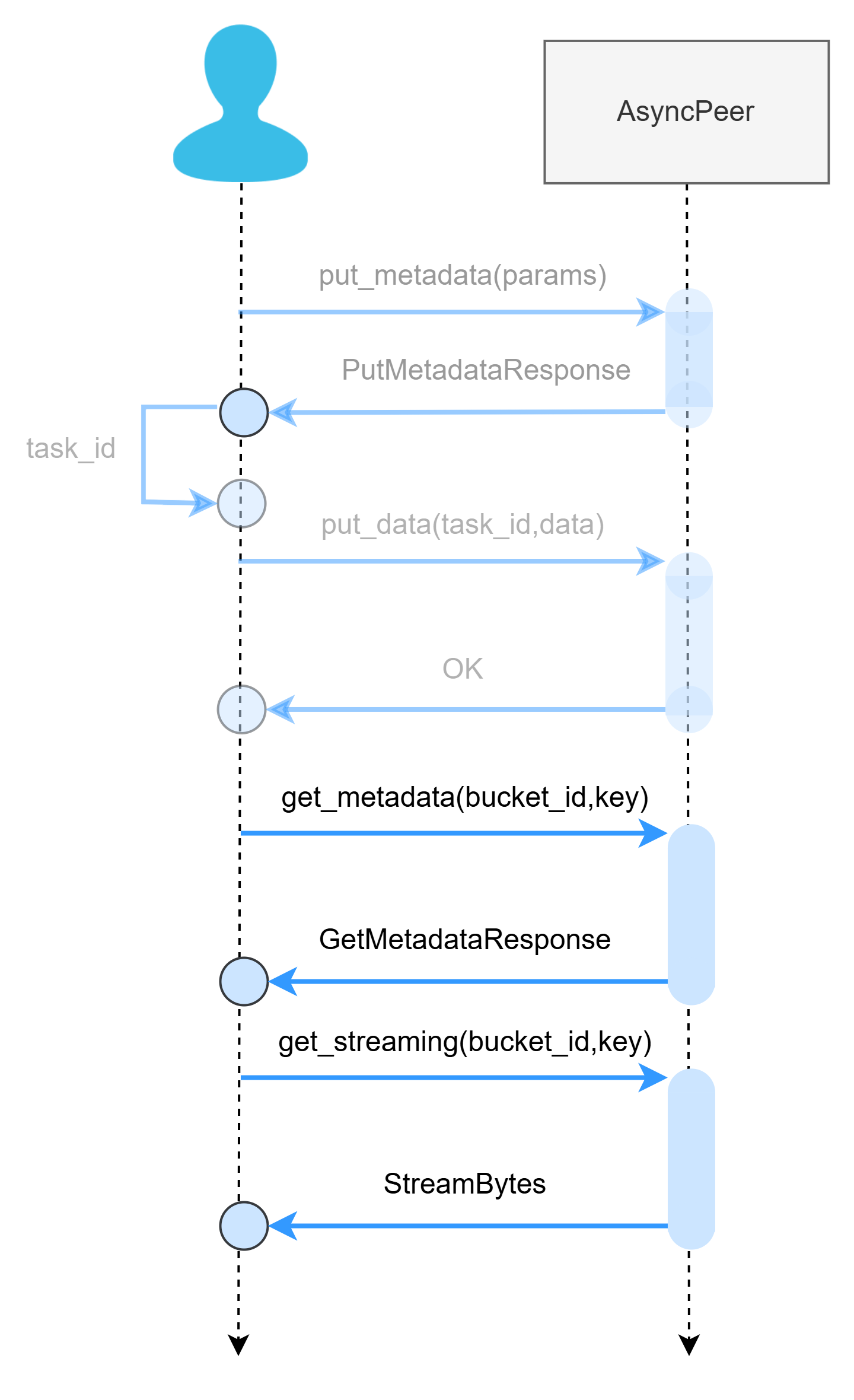
metadata = await peer.get_metadata(bucket_id=bucket_id, key=key)


data_res = await peer.get_streaming(bucket_id=bucket_id, key=key)

# body     = data_res.data
examples/peer/03_get.py.
You can run it directly from the CLI with your chosen arguments:
Check bucket metadata (change http://localhost:24000/api/v4/buckets/<bucket_id>/metadata
Check Chunk metadata (change http://localhost:24000/api/v4/buckets/<bucket_id>/metadata/<ball_id>
2. Router (VSS)
Use AsyncRouter when you want the router to choose a healthy peer (load balancing, retries, awareness of cluster state or replication) and operate the system as a Virtual Storage Space (VSS) . The API is intentionally very similar to Peer.
A VSS is the logical boundary formed by one router (or more, for HA) plus a set of storage peers. From the client’s point of view, a VSS behaves like one storage service—even though data is actually placed, replicated, and served by multiple peers behind the router.
What the Router does inside a VSS
-
Peer selection & load-balancing: chooses a target peer for each request based on health and load.
-
Retries & failover: transparently retries on other peers if a node is slow/unavailable.
-
Cluster awareness: tracks which peers hold replicas and where to read/write.
-
Policy hooks: can coordinate replication, placement, or future policies without changing client code.
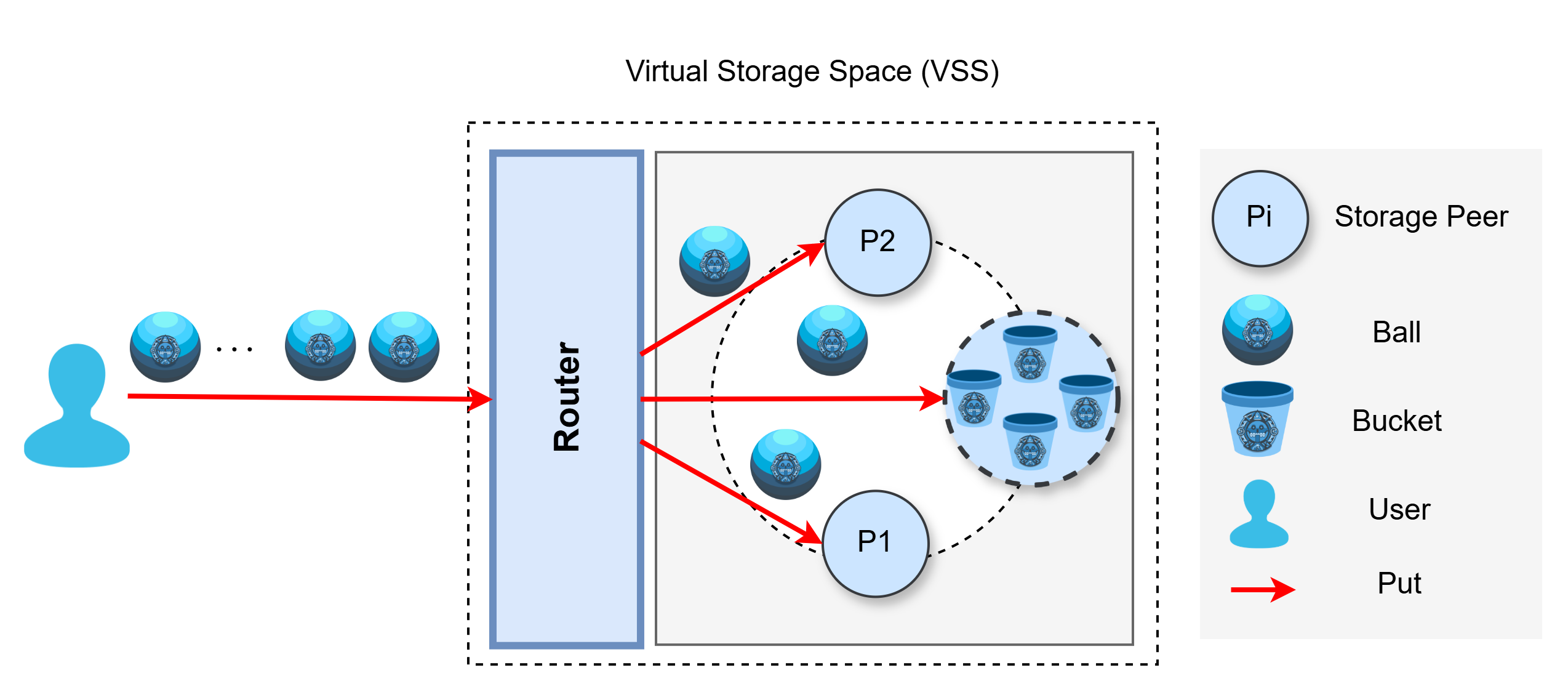
Conceptual representation architecture of a VSS.
At the “global” or higher-level view of the system, a VSS is represented as a hexagon. Think of the hexagon as the logical boundary that groups:
-
one (or more) Router(s) in front, and
-
a pool of Storage Peers behind it,
so the VSS behaves like a single storage service to your applications.
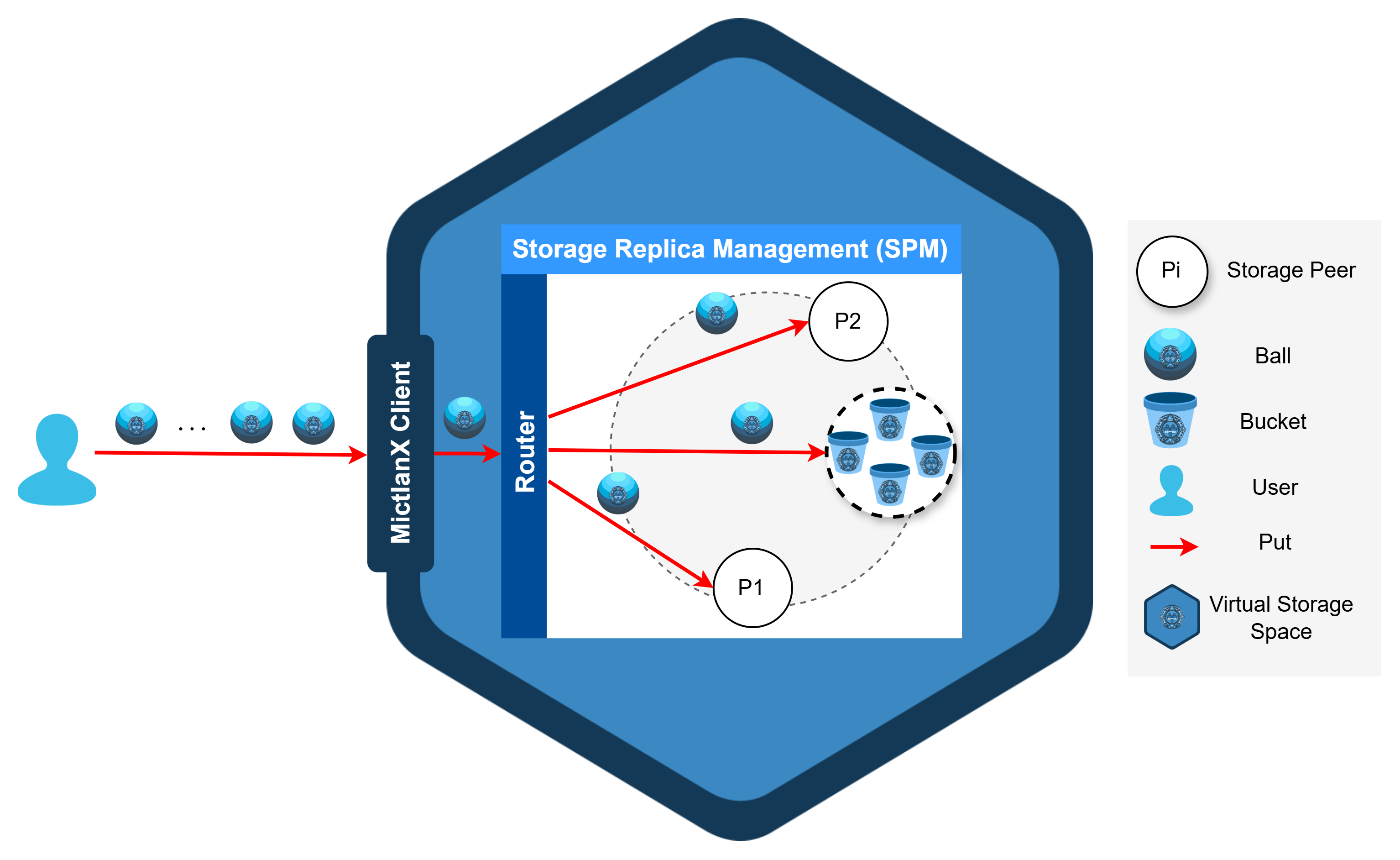
Conceptual representation of a VSS.
Inside that hexagon, the Router decides which peer should handle a request, while Peers store and serve balls inside buckets.
PUT & GET through the VSS
-
PUT: Client → Router → chosen Peer(s). Router validates metadata first (size/checksum) and then streams bytes to the selected peer. Replication can be triggered after the first successful write.
-
GET: Client → Router → best Peer for that ball. Router picks a close/healthy replica and streams the data back to the client.
These examples assume you have a router running locally (e.g., from mictlanx-router.yml) at http://127.0.0.1:60666 and two test peers behind it.
1) Define the Router and prepare the data and identifiers
router = AsyncRouter(
    router_id   = "router-0",
    ip_addr     = "localhost",
    port        = 60666,
    protocol    = "http",
    api_version = 4,
    http2       = False,
)

bucket_id = "mictlanx"
ball_id   = "bx"                    # logical group
key       = "hello-object-router"          # this concrete object
body      = b"Hello from AsyncRouter"
checksum  = hashlib.sha256(body).hexdigest()
2) Put metadata
res = router.put_metadata(
  bucket_id    = bucket_id,
  ball_id      = ball_id,
  key          = key,
  size         = len(body),
  checksum     = checksum,
  producer_id  = "client-0",
  content_type = "text/plain",
  tags         = {"fullname": "hello.txt", "extension": "txt"},
)

if res.is_err:
    print("PUT_METADATA failed:", res.unwrap_err())
    return

tasks_ids:List[str] = res.unwrap().tasks_ids
This example is implemented in examples/router/01_put_metadata.py.
You can run it directly from the CLI with your chosen arguments:
3. Put data
Uploads the actual bytes using a task_id from step 2.
body    = b"Hello from AsyncRouter"  # must match size/checksum sent in metadata
put_data_result = await router.put_data(
    task_id      = task_id,
    key          = key,
    value        = body,
    content_type = "text/plain",
)
This example is implemented in examples/router/02_put_data.py.
You can run it directly from the CLI with your chosen arguments:
Getting started 🚀
AsyncClient is the high-level, batteries-included interface: it talks to one or more Routers, picks a healthy one (load-balancing), streams data in chunks, applies retries + exponential backoff, and verifies integrity with SHA-256. It also provides convenience helpers such as put_file() and get_to_file().
URI Format
AsyncClient receives a single uri string and internally builds Router objects.
The format is parsed by MictlanXURI.parse() (shown below) and supports one or more routers.
- Scheme:
mictlanx:// - Routers list: comma-separated specs, each as
router_id@host:port. - Global query (applies to all routers):
protocol,api_version,http2. - The first
/or?separates the router list from the global query block.
Canonical form (what MictlanXURI.build() produces):
mictlanx://<router_id@host:port>[,<router_id@host:port>]/?protocol=<http|https>&api_version=<int>&http2=<0|1>
Examples
- Single local router:
- Two routees HTTPS + HTTP/2
- Programmatically build a URI from
AsyncRouterinstances:from mictlanx.services import AsyncRouter from mictlanx.utils.uri import MictlanXURI routers = [ AsyncRouter(router_id="mictlanx-router-0", ip_addr="localhost", port=60666, protocol="http", api_version=4), AsyncRouter(router_id="mictlanx-router-1", ip_addr="localhost", port=60667, protocol="http", api_version=4), ] uri = MictlanXURI.build(routers) # -> "mictlanx://mictlanx-router-0@localhost:60666,.../?protocol=http&api_version=4&http2=0"
⚠️ If you see ValueError: no routers, you likely left an empty entry (e.g. trailing comma) or didn’t pass any routers before the query.
Create a Client
⚠️ Before running the examples, you need a local Virtual Storage Space (one Router + a couple of Peers). deploy_router.sh spins up that test stack with Docker Compose so the client has something to talk to.
How to deploy it:
import asyncio
from mictlanx import AsyncClient

async def main():
    uri = "mictlanx://mictlanx-router-0@localhost:60666/?protocol=http&api_version=4&http2=0"
    client = AsyncClient(
        uri              = uri,
        client_id        = "client-0",
        debug            = True,                 # console DEBUG logs
        log_output_path  = "/mictlanx/client",   # file logs live here (rotated)
        eviction_policy  = "LRU",
        capacity_storage = "1GB",
        verify           = False                 # set True or a CA bundle path for HTTPS
    )
asyncio.run(main())
1. Put
The client cuts your payload into chunks, uploads them in parallel with retries, and stores the checksum in the object’s metadata for integrity verification later.
This example is implemented inexamples/client/01_put.py.
You can run it directly from the CLI with your chosen arguments:
python3 examples/client/01_put.py \
  --bucket_id mictlanx \
  --ball_id hello-object \
  --path ./samples/hello.txt \
  --chunk_size 1MB \
  --tag content_type=text/plain
2. Get
AsyncClient.get() looks up the object’s metadata to discover how many chunks exist, downloads them in parallel with retries + exponential backoff, reassembles the bytes, and (by default) verifies integrity against the stored SHA-256.
# fetch bytes back into memory
res = await client.get(
    bucket_id    = bucket_id,
    key          = key,        # the same logical id you used on PUT
    chunk_size   = "1MB",      # request size hint; peer may adjust
    max_retries  = 8,
    max_paralell_gets = 8,     # parallel chunk downloads
)

if res.is_ok:
    out = res.unwrap()         # AsyncGetResponse
    data = out.data.tobytes()  # assembled bytes
    metas = out.metadatas      # per-chunk metadata (list)
    print("got", len(data), "bytes")
else:
    print("GET failed:", res.unwrap_err())
get_to_file():
path_res = await client.get_to_file(
    bucket_id     = bucket_id,
    ball_id       = key,       # same value as `key` above
    output_path   = "./downloads",
    fullname      = "hello.txt",  # optional; defaults from tags if present
    chunk_size    = "1MB",
)

if path_res.is_ok:
    print("saved to:", path_res.unwrap())
else:
    print("GET->file failed:", path_res.unwrap_err())
This example is implemented in examples/client/02_get.py.
Run it from the CLI (works with the local stack started by deploy_router.sh):
# bytes into memory (prints size)
python3 examples/client/02_get.py \
  --bucket_id mictlanx \
  --key       hello-object \
  --chunk_size 1MB

# stream directly to a file
python3 examples/client/02_get.py \
  --bucket_id mictlanx \
  --key       hello-object \
  --to_file \
  --out       ./downloads \
  --fullname  hello.txt \
  --chunk_size 1MB
⚠️ --key must match the logical id you used on PUT.